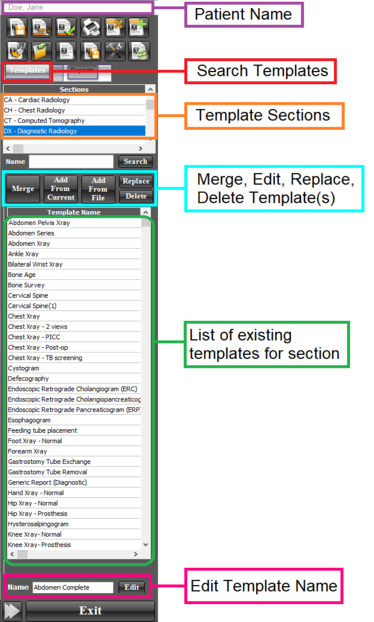
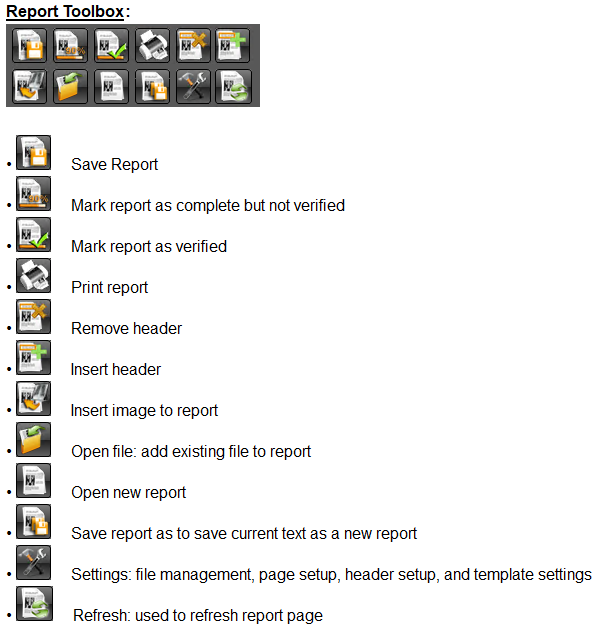
The templates panel enables the user to find, use, edit, add, delete, and replace templates. An overview of the template panel is shown below:
Open template
To open a template, follow the instructions below:
1. In the template panel, select the appropriate section that the template is in.
2. Double-click on the template name from the template list The template will now be opened in the report document
Add new template (from file)
To add a file on the workstation as a template, follow the instructions below:
1. In the template panel, select the appropriate section that the template should be saved in.
2. Click on the ‘Add from File’ icon
3. A new window will appear - find the template file of interest from the file browser and click ‘Open’. The template will now be added in the template list.
Create new template (from report document)
To add the current report document as a new template, follow the instructions below:
1. In the template panel, select the appropriate section that the template should be saved in.
2. Click on the ‘Add from current’ icon
3. A new window will appear - type in the name for the new template and click ‘OK’ The template will now be added in the template list.
Edit / replace existing template
To edit an existing template, follow the instructions below:
1. In the template panel, select the appropriate section that the template is in.
2. Double click on the template name from the list of templates
3. Make the necessary changes to the template in the report document
4. Click on the ‘Replace icon’ icon
5. A new window will appear warning the user that the template will be replaced, click on ‘Yes’. The template will now replaced.
Delete existing template
To delete an existing template, follow the instructions below:
1. In the template panel, select the appropriate section that the template is in.
2. Click on the template name from the list of templates
3. Click on the ‘Delete’ icon
4. A new window will appear warning the user that the template will be deleted, click on ‘Yes’. The template will now deleted.
Search for an existing template
To search for an existing template, follow the instructions below:
1. In the template panel, select the appropriate Section that the template is in.
2. Type in the template name in the search bar and click on ‘Search’. The list of templates matching the search criteria will be shown in the Template list.